interleaved-thinking skill (Agent-Skills-for-Context-Engineering)
- Install
- SKILL.md (verbatim)
- When to Activate
- Core Concepts
- Interleaved Thinking
- The Optimization Loop
- Pattern Detection
- Usage Modes
- Mode 1: M2.1 Agent Debugging
- Mode 2: Full Optimization Loop
- Mode 3: Universal Session Analysis
- Mode 4: Generate Shareable Skills
- CLI Commands
- Integration with Claude Code
- Auto-trigger on Failure
- On-demand Analysis
- Guidelines
- Examples
- Before Optimization
- After Optimization
- References
- Skill Metadata
- Other files in this skill
- README.md (verbatim)
- The Problem
- The Solution
- Why MiniMax M2.1?
- Key Features
- Pattern Detection
- Quick Start
- Installation
- Configuration
- Basic Usage
- How It Works
- The Optimization Loop
- What Gets Captured
- What Gets Analyzed
- Examples
- Example 1: Basic Trace Capture
- Example 2: Tool Usage with Analysis
- Example 3: Full Optimization Loop
- Generated Artifacts
- Optimization Artifacts
- Generated Skills
- API Reference
- TraceCapture
- TraceAnalyzer
- OptimizationLoop
- SkillGenerator
- CLI Usage
- Real-World Sources Used
- Robustness Features
- Parsing Resilience
- Extended Test Results (10 iterations)
- Architecture
- Integration
- Claude Code Skill
- Python Library
- Contributing
- License
- References
- docs/agentthinking.md (verbatim)
- The Real Agent Alignment Problem: Benchmarks or Reality?
- The Need for Interleaved Thinking
- True Generalization is About Perturbation
- What's Next?
- Getting Involved
- docs/m2-1.md (verbatim)
- Quick Start
- 1. Install Anthropic SDK
- 2. Configure Environment Variables
- 3. Call API
- 4. Important Note
- Supported Models
- Compatibility
- Supported Parameters
- Messages Field Support
- Examples
- Streaming Response
- Tool Use & Interleaved Thinking
- Important Notes
- Related Links
- Recommended Reading
What it does. Debug and optimize AI agents by analyzing reasoning traces, context degradation, tool confusion, instruction drift, repeated task failures, and performance regressions. Part of muratcankoylan/Agent-Skills-for-Context-Engineering (muratcankoylan/Agent-Skills-for-Context-Engineering).
| Upstream | muratcankoylan/Agent-Skills-for-Context-Engineering |
| Skill file | examples/interleaved-thinking/SKILL.md |
| License | MIT |
| Author | Muratcan Koylan |
| Fetched | 2026-09-10 |
Install
npx skills add muratcankoylan/Agent-Skills-for-Context-Engineering --skill interleaved-thinking, or copy the skill folder into~/.claude/skills/interleaved-thinking/.- Raw file:
curl -sL https://raw.githubusercontent.com/muratcankoylan/Agent-Skills-for-Context-Engineering/HEAD/examples/interleaved-thinking/SKILL.md
SKILL.md (verbatim)
name: reasoning-trace-optimizer
description: "Debug and optimize AI agents by analyzing reasoning traces, context degradation, tool confusion, instruction drift, repeated task failures, and performance regressions."
Reasoning Trace Optimizer
Debug and optimize AI agents by analyzing their reasoning traces. This skill uses MiniMax M2.1's interleaved thinking to provide deep insight into agent decision-making and generate concrete improvements.
When to Activate
- Agent reasoning traces need debugging, analysis, or prompt optimization
- Agent task fails and user wants to understand why
- User mentions "context degradation", "tool confusion", or "instruction drift"
- Request to improve agent performance or reduce errors
- User wants to generate shareable learnings from debugging sessions
- After repeated failures on similar tasks
Core Concepts
Interleaved Thinking
Unlike standard reasoning models that think once at the start, interleaved thinking allows reasoning BETWEEN each tool interaction. This is critical because:
- Long-horizon tasks require maintaining focus across many turns
- External perturbations (tool outputs, environment changes) need real-time adaptation
- Debugging requires seeing HOW decisions were made, not just WHAT was output
The Optimization Loop
Execute Agent → Capture Traces → Analyze Patterns → Optimize Prompt → Re-run
                                                          ↑____________|
Each iteration improves the prompt based on detected patterns until convergence.
Pattern Detection
Common failure patterns the analyzer detects:
| Pattern | Description |
|---|---|
context_degradation |
Model loses track of information over long contexts |
tool_confusion |
Model misunderstands tool capabilities or outputs |
instruction_drift |
Model gradually deviates from original instructions |
goal_abandonment |
Model stops pursuing the original goal |
circular_reasoning |
Model repeats similar actions without progress |
premature_conclusion |
Model concludes before completing the task |
Usage Modes
Mode 1: M2.1 Agent Debugging
Run a task through M2.1 and analyze its reasoning:
from reasoning_trace_optimizer import TraceCapture, TraceAnalyzer

capture = TraceCapture()
trace = capture.run(
    task="Search for Python tutorials and summarize them",
    system_prompt="You are a research assistant.",
    tools=[search_tool],
    tool_executor=execute_search
)

analyzer = TraceAnalyzer()
analysis = analyzer.analyze(trace)

print(f"Score: {analysis.overall_score}/100")
for pattern in analysis.patterns:
    print(f"Found: {pattern.type.value} - {pattern.suggestion}")
Mode 2: Full Optimization Loop
Automatically iterate until the prompt is optimized:
from reasoning_trace_optimizer import OptimizationLoop, LoopConfig

config = LoopConfig(
    max_iterations=5,
    min_score_threshold=80.0,
)

loop = OptimizationLoop(config=config)
result = loop.run(
    task="Analyze this codebase and suggest improvements",
    initial_prompt="You are a code reviewer.",
    tools=[read_file_tool, search_tool],
    tool_executor=execute_tool
)

print(f"Improved: {result.initial_score} → {result.final_score}")
print(f"Final prompt:\n{result.final_prompt}")
Mode 3: Universal Session Analysis
Analyze any agent's previous thinking (works with Claude, GPT, etc.):
When this skill is activated in Claude Code, it can analyze the current session's thinking blocks to identify issues and suggest improvements.
/reasoning-trace-optimizer analyze-session
Mode 4: Generate Shareable Skills
Convert optimization learnings into reusable Agent Skills:
from reasoning_trace_optimizer import SkillGenerator

generator = SkillGenerator()
skill_path = generator.generate(
    result=loop_result,
    skill_name="web-search-best-practices",
    output_dir="./skills"
)
CLI Commands
# Capture reasoning trace
rto capture "Search for Python tutorials" -s "You are a helpful assistant."

# Analyze a task
rto analyze "Debug this code" -o analysis.txt

# Run optimization loop
rto optimize "Research AI papers" --max-iterations 5 --generate-skill

# Generate skill from artifacts
rto generate-skill my-skill-name --artifacts-dir ./optimization_artifacts
Integration with Claude Code
Auto-trigger on Failure
Add to your hooks to automatically analyze failures:
{
  "hooks": {
    "post_tool_error": {
      "command": "rto analyze-session --last-error"
    }
  }
}
On-demand Analysis
Use the slash command to analyze current session:
/reasoning-trace-optimizer
This will:
- Extract thinking blocks from the current session
- Identify patterns and issues
- Suggest prompt improvements
- Optionally update the system prompt
Guidelines
- Preserve full context: M2.1 requires full response history including thinking blocks for optimal performance
- Use appropriate tools: Define tools clearly with unambiguous descriptions
- Set realistic convergence thresholds: 5-10% improvement per iteration is typical
- Review generated skills: Auto-generated skills should be reviewed before sharing
- Monitor token usage: Each optimization iteration uses significant tokens
Examples
Before Optimization
System: You are a helpful assistant.

Issue: Agent called wrong tools, lost track of goal after 3 turns
Score: 45/100
Patterns: tool_confusion, goal_abandonment
After Optimization
System: You are a research assistant focused on finding accurate information.

IMPORTANT GUIDELINES:
- Always verify search results before summarizing
- If a tool returns an error, try an alternative approach
- Keep track of your original goal throughout the task
- Validate findings against multiple sources when possible

Issue: None
Score: 85/100
Patterns: None detected
References
- MiniMax M2.1 Documentation: https://platform.minimax.io/docs
- Interleaved Thinking Guide: See
docs/interleavedthinking.md - Agent Generalization: See
docs/agentthinking.md
Skill Metadata
Created: 2025-01-11 Author: Muratcan Koylan Version: 0.1.0 Powered by: MiniMax M2.1 Partnership: Built in collaboration with MiniMax AI
Other files in this skill
- README.md
- docs/agentthinking.md
- docs/interleavedthinking.md
- docs/m2-1.md
- examples/01_basic_capture.py
- examples/02_tool_usage.py
- examples/03_full_optimization.py
- generated_skills/comprehensive-research-agent/SKILL.md
- generated_skills/comprehensive-research-agent/references/optimization_summary.json
- generated_skills/comprehensive-research-agent/references/optimized_prompt.txt
- generated_skills/comprehensive-research-agent/references/patterns_found.json
- optimization_artifacts/final_prompt.txt
- optimization_artifacts/iteration_1/analysis.txt
- optimization_artifacts/iteration_1/optimization.txt
- optimization_artifacts/iteration_1/optimized_prompt.txt
- optimization_artifacts/iteration_1/trace.txt
- optimization_artifacts/iteration_10/analysis.txt
- optimization_artifacts/iteration_10/trace.txt
- optimization_artifacts/iteration_2/analysis.txt
- optimization_artifacts/iteration_2/optimization.txt
- optimization_artifacts/iteration_2/optimized_prompt.txt
- optimization_artifacts/iteration_2/trace.txt
- optimization_artifacts/iteration_3/analysis.txt
- optimization_artifacts/iteration_3/optimization.txt
- optimization_artifacts/iteration_3/optimized_prompt.txt
- optimization_artifacts/iteration_3/trace.txt
- optimization_artifacts/iteration_4/analysis.txt
- optimization_artifacts/iteration_4/optimization.txt
- optimization_artifacts/iteration_4/optimized_prompt.txt
- optimization_artifacts/iteration_4/trace.txt
- optimization_artifacts/iteration_5/analysis.txt
- optimization_artifacts/iteration_5/optimization.txt
- optimization_artifacts/iteration_5/optimized_prompt.txt
- optimization_artifacts/iteration_5/trace.txt
- optimization_artifacts/iteration_6/analysis.txt
- optimization_artifacts/iteration_6/optimization.txt
- optimization_artifacts/iteration_6/optimized_prompt.txt
- optimization_artifacts/iteration_6/trace.txt
- optimization_artifacts/iteration_7/analysis.txt
- optimization_artifacts/iteration_7/optimization.txt
- optimization_artifacts/iteration_7/optimized_prompt.txt
- optimization_artifacts/iteration_7/trace.txt
- optimization_artifacts/iteration_8/analysis.txt
- optimization_artifacts/iteration_8/optimization.txt
- optimization_artifacts/iteration_8/optimized_prompt.txt
- optimization_artifacts/iteration_8/trace.txt
- optimization_artifacts/iteration_9/analysis.txt
- optimization_artifacts/iteration_9/optimization.txt
- optimization_artifacts/iteration_9/optimized_prompt.txt
- optimization_artifacts/iteration_9/trace.txt
- optimization_artifacts/summary.json
- pyproject.toml
- reasoning_trace_optimizer/init.py
- reasoning_trace_optimizer/analyzer.py
- reasoning_trace_optimizer/capture.py
- reasoning_trace_optimizer/cli.py
- reasoning_trace_optimizer/loop.py
- reasoning_trace_optimizer/models.py
- reasoning_trace_optimizer/optimizer.py
- reasoning_trace_optimizer/skill_generator.py
- ... and 2 more (see the folder)
README.md (verbatim)
2 placeholder credentials shortened to pass the site's secret filter.
Reasoning Trace Optimizer
<p align="center"> <strong>Debug and optimize AI agents by analyzing reasoning traces with MiniMax M2.1's interleaved thinking</strong> </p><p align="center"> <a href="#key-features">Features</a> | <a href="#quick-start">Quick Start</a> | <a href="#how-it-works">How It Works</a> | <a href="#examples">Examples</a> | <a href="#api-reference">API Reference</a> </p>The Problem
Traditional AI agents fail in opaque ways. You see the final output, but not why decisions were made. When an agent:
- Calls the wrong tool
- Loses track of the goal
- Makes up information
...you're left guessing where things went wrong.
The Solution
Reasoning Trace Optimizer uses MiniMax M2.1's unique interleaved thinking capability to expose the agent's reasoning process between every tool call. This enables:
- Deep Debugging - See exactly where reasoning diverged from expected behavior
- Pattern Detection - Automatically identify failure modes (context degradation, tool confusion, etc.)
- Automated Optimization - Generate improved prompts based on detected issues
- Shareable Skills - Convert learnings into reusable Agent Skills for team sharing
Why MiniMax M2.1?
M2.1's interleaved thinking is fundamentally different from traditional reasoning models:
Traditional:  Think → Act → Act → Act → Done
              ↑
              (reasoning only at start)

M2.1:         Think → Act → Think → Act → Think → Act → Done
              ↑            ↑              ↑
              (continuous reasoning between each tool call)
This matters for agents because:
- Long tasks require maintaining focus across many turns
- Tool outputs introduce unexpected information requiring adaptation
- Debugging needs visibility into decision-making, not just outputs
The thinking block (Anthropic SDK) or reasoning_details field (OpenAI SDK) exposes this reasoning for analysis.
Key Features
| Component | Description |
|---|---|
| TraceCapture | Wrap M2.1 API to capture all thinking blocks with full context |
| TraceAnalyzer | Detect patterns like context degradation, tool confusion, instruction drift |
| PromptOptimizer | Generate improved prompts based on analysis using M2.1 |
| OptimizationLoop | Automated capture → analyze → improve → re-run cycle |
| SkillGenerator | Convert learnings into shareable Agent Skills |
Pattern Detection
The analyzer automatically identifies these failure patterns:
| Pattern | Description | Severity |
|---|---|---|
context_degradation |
Model loses information over long contexts | High |
tool_confusion |
Model misunderstands tool capabilities | High |
instruction_drift |
Model deviates from original instructions | Medium |
hallucination |
Model generates unsupported information | Critical |
goal_abandonment |
Model stops pursuing the original goal | High |
circular_reasoning |
Model repeats similar actions without progress | Medium |
premature_conclusion |
Model concludes before completing task | Medium |
missing_validation |
Model doesn't verify results | High |
Each detected pattern includes:
- Evidence - Specific excerpts from thinking blocks
- Severity - Critical/High/Medium/Low
- Suggestion - Concrete improvement for the prompt
- Confidence - How certain the detection is
Quick Start
Installation
cd examples/interleaved-thinking
pip install -e .
Configuration
Set your MiniMax API key:
export ANTHROPIC_API_KEY=YOUR_KEY
export ANTHROPIC_BASE_URL=https://api.minimax.io/anthropic
Or create a .env file:
ANTHROPIC_API_KEY=YOUR_KEY
ANTHROPIC_BASE_URL=https://api.minimax.io/anthropic
Basic Usage
from reasoning_trace_optimizer import TraceCapture, TraceAnalyzer

# Capture reasoning trace
capture = TraceCapture()
trace = capture.run(
    task="Explain quantum computing",
    system_prompt="You are a science educator."
)

print(f"Captured {len(trace.thinking_blocks)} thinking blocks")

# Analyze the reasoning
analyzer = TraceAnalyzer()
analysis = analyzer.analyze(trace)

print(f"Overall Score: {analysis.overall_score}/100")
for pattern in analysis.patterns:
    print(f"  [{pattern.severity.value}] {pattern.type.value}")
    print(f"    Suggestion: {pattern.suggestion}")
How It Works
The Optimization Loop
┌─────────────────────────────────────────────────────────────────────────┐
│                       OPTIMIZATION LOOP                                 │
│                                                                         │
│   ┌──────────┐    ┌──────────┐    ┌──────────┐    ┌──────────┐          │
│   │  Agent   │───▶│ Capture  │───▶│ Analyze  │───▶│ Optimize │          │
│   │ Execute  │    │ Traces   │    │ Patterns │    │  Prompt  │          │
│   └──────────┘    └──────────┘    └──────────┘    └──────────┘          │
│        ▲                                               │                │
│        └───────────────────────────────────────────────┘                │
│                       (loop until converged or max iterations)          │
│                                                                         │
│   Convergence: Score improvement < threshold OR score > target          │
└─────────────────────────────────────────────────────────────────────────┘
What Gets Captured
For each agent execution, we capture:
- Thinking Blocks - M2.1's reasoning before each action
- Tool Calls - What tools were called with what inputs
- Tool Results - What each tool returned
- Final Response - The agent's output
- Metadata - Tokens used, turns taken, success/failure
What Gets Analyzed
The analyzer examines thinking blocks to understand:
- Current Understanding - What does the agent believe about the task?
- Tool Interpretation - How did it interpret each tool result?
- Alternatives Considered - What options did it evaluate?
- Goal Awareness - Is it still pursuing the original objective?
Examples
Example 1: Basic Trace Capture
# examples/01_basic_capture.py
from reasoning_trace_optimizer import TraceCapture

capture = TraceCapture()
trace = capture.run(
    task="Explain what interleaved thinking is and why it matters for AI agents.",
    system_prompt="You are an AI researcher explaining concepts clearly."
)

# Output:
# Captured 1 thinking block
# Turn 0: "The user is asking me to explain 'interleaved thinking'..."
Example 2: Tool Usage with Analysis
# examples/02_tool_usage.py
from reasoning_trace_optimizer import TraceCapture, TraceAnalyzer

# Define tools
tools = [
    {
        "name": "get_weather",
        "description": "Get current weather for a city",
        "input_schema": {...}
    }
]

capture = TraceCapture()
trace = capture.run(
    task="Compare the weather in San Francisco and New York",
    tools=tools,
    tool_executor=execute_tool
)

# Analyze
analyzer = TraceAnalyzer()
analysis = analyzer.analyze(trace)

# Output:
# Score: 85/100
# Thinking Blocks: 3
# Tool Calls: 4 (get_weather x2, get_forecast x2)
# Patterns: None detected
Example 3: Full Optimization Loop
This example demonstrates a complex research task with 7 tools (web search, file operations, note-taking):
# examples/03_full_optimization.py
from reasoning_trace_optimizer import OptimizationLoop, LoopConfig, SkillGenerator

config = LoopConfig(
    max_iterations=3,
    min_score_threshold=85.0,
    convergence_threshold=5.0,
    save_artifacts=True,
)

loop = OptimizationLoop(config=config)
result = loop.run(
    task="""Research "context engineering for AI agents" and create a summary...""",
    initial_prompt="You are a research assistant.",
    tools=TOOLS,
    tool_executor=execute_tool,
)

# Generate shareable skill
generator = SkillGenerator()
skill_path = generator.generate(result, skill_name="research-agent")
Actual Output from Example 3:
======================================================================
OPTIMIZATION RESULTS
======================================================================

Total Iterations: 3
Converged: Yes

ITERATION 1 (Score: 69/100)
├── Task Completed: Yes
├── Thinking Blocks: 6
├── Tool Calls: 16
├── Patterns Found: 2
│   ├── [LOW] missing_validation
│   └── [LOW] incomplete_reasoning
├── Strengths: Excellent goal adherence, thorough source diversity
└── Warning: Prompt grew too large (2979 chars), limiting growth

ITERATION 2 (Score: 60/100)  ← Regression detected!
├── Task Completed: Yes
├── Thinking Blocks: 8
├── Tool Calls: 16
├── Patterns Found: 3
│   ├── [MEDIUM] incomplete_reasoning
│   ├── [MEDIUM] missing_validation
│   └── [LOW] tool_misuse

ITERATION 3 (Score: 66/100)
├── Task Completed: Yes
├── Thinking Blocks: 8
├── Tool Calls: 16
└── Patterns Found: 3

→ Using best prompt from iteration 1 (score: 67.6)

TOOL USAGE ACROSS ALL ITERATIONS:
├── read_url: 20 calls
├── web_search: 12 calls
├── list_directory: 7 calls
├── save_note: 6 calls
└── write_file: 3 calls

NOTES SAVED: 6 research notes with tagged findings
FILES WRITTEN: ./output/research_summary.md (11,357 chars)

GENERATED SKILL: ./generated_skills/comprehensive-research-agent/SKILL.md
Key Features Demonstrated:
- Prompt Growth Limiting - Prevents prompt bloat by limiting expansion to 3x original size
- Best Score Tracking - Automatically uses the best-performing prompt, even if later iterations regress
- Regression Detection - Warns when scores drop and can stop after consecutive regressions
Generated Artifacts
Optimization Artifacts
Each optimization run creates artifacts for inspection:
optimization_artifacts/
├── summary.json              # Overall results
├── final_prompt.txt          # The optimized prompt
├── iteration_1/
│   ├── trace.json            # Full reasoning trace
│   ├── analysis.json         # Pattern detection results
│   └── optimization.json     # Prompt changes made
├── iteration_2/
│   └── ...
└── iteration_3/
    └── ...
Generated Skills
The SkillGenerator converts optimization learnings into shareable Agent Skills:
generated_skills/
└── comprehensive-research-agent/
    ├── SKILL.md              # The shareable skill
    └── references/
        ├── optimization_summary.json
        ├── optimized_prompt.txt
        └── patterns_found.json
Example Generated Skill Content:
## Patterns to Avoid

- **Missing Validation**: Accepting tool responses at face value without
  verifying the actual state change occurred.
- **Hallucinating Sources**: Citing sources that failed to load.
- **Ignoring Contradictions**: Proceeding when tool results conflict.

## Recommended Practices

- After every tool call, state the outcome explicitly
- Track sources separately: 'attempted' vs 'successful'
- Implement error recovery with alternative approaches
- Cross-reference key claims against multiple sources
API Reference
TraceCapture
capture = TraceCapture(
    api_key="...",                              # MiniMax API key
    base_url="https://api.minimax.io/anthropic", # API endpoint
    model="MiniMax-M2.1"                        # Model to use
)

trace = capture.run(
    task="...",                    # The task to execute
    system_prompt="...",           # System prompt
    tools=[...],                   # Tool definitions (Anthropic format)
    tool_executor=fn,              # Function to execute tools
    max_turns=10,                  # Maximum conversation turns
    max_tokens=4096                # Max tokens per response
)
TraceAnalyzer
analyzer = TraceAnalyzer(
    api_key="...",
    base_url="https://api.minimax.io/anthropic",
    model="MiniMax-M2.1"
)

analysis = analyzer.analyze(trace)
# Returns: AnalysisResult with patterns, scores, recommendations

quick_score = analyzer.quick_score(trace)
# Returns: float (0-100) for fast feedback
OptimizationLoop
config = LoopConfig(
    # Iteration control
    max_iterations=5,           # Maximum optimization iterations
    convergence_threshold=3.0,  # Stop if improvement < this %
    min_score_threshold=75.0,   # Stop if score exceeds this
    regression_threshold=8.0,   # Warn if score drops by this much

    # Optimization behavior
    use_best_prompt=True,       # Use best-performing prompt, not final
    max_prompt_growth=5.0,      # Limit prompt expansion to 5x original

    # Output options
    save_artifacts=True,        # Save traces and analyses
    artifacts_dir="./artifacts" # Where to save
)

loop = OptimizationLoop(config=config)
result = loop.run(task, initial_prompt, tools, tool_executor)
# Returns: LoopResult with iterations, final_prompt, scores
Optimization Safeguards:
- Best Prompt Tracking: Keeps the prompt that produced the highest score
- Prompt Growth Limiting: Prevents prompt bloat by limiting size expansion
- Regression Detection: Warns on score drops, stops after consecutive regressions
Score Expectations:
| Task Complexity | Typical Score Range | Notes |
|---|---|---|
| Simple (1-2 tools) | 80-95 | Straightforward tasks converge quickly |
| Medium (3-5 tools) | 70-85 | Multiple tool coordination adds variability |
| Complex (6+ tools, multi-step) | 60-75 | Inherent variance in long reasoning chains |
Complex research tasks with many tools and steps typically plateau around 65-75 due to:
- Tool output variability affecting reasoning paths
- Multiple valid approaches leading to different scoring
- The stochastic nature of multi-step agent execution
The optimizer focuses on relative improvement and pattern elimination rather than achieving a specific absolute score.
SkillGenerator
generator = SkillGenerator()
skill_path = generator.generate(
    result=loop_result,           # From OptimizationLoop
    skill_name="my-skill",        # Lowercase with hyphens
    output_dir="./generated_skills",
    title="Human Readable Title"
)
CLI Usage
# Capture a reasoning trace
rto capture "Explain interleaved thinking" -s "You are an AI researcher."

# Analyze a task and output results
rto analyze "Debug this code snippet" -o analysis.txt

# Run full optimization loop
rto optimize "Research AI papers" --max-iterations 5 --generate-skill

# Generate skill from previous optimization
rto generate-skill my-skill-name --artifacts-dir ./optimization_artifacts
Real-World Sources Used
Example 3 uses real documentation URLs for realistic simulation:
| Source | URL |
|---|---|
| Anthropic Docs | docs.anthropic.com/en/docs/build-with-claude/* |
| Anthropic Research | anthropic.com/research/building-effective-agents |
| OpenAI Docs | platform.openai.com/docs/guides/* |
| MiniMax M2.1 | minimax.io/platform/docs/M2.1 |
| DAIR.AI | promptingguide.ai/techniques |
| LangChain | python.langchain.com/docs/how_to/debugging |
| arXiv Papers | arxiv.org/abs/2307.03172 (Lost in the Middle) |
Robustness Features
The optimizer includes several safeguards to handle real-world variability:
Parsing Resilience
LLM responses don't always produce valid JSON. The system handles this gracefully:
| Component | Fallback Behavior |
|---|---|
| Analyzer | Extracts scores via regex patterns when JSON fails; defaults to 50/100 (not 0) |
| Optimizer | Multi-strategy prompt extraction: JSON → regex → marker detection → code blocks |
| Loop | Warns when final prompt is unchanged; tracks best-performing iteration |
Extended Test Results (10 iterations)
Real-world testing revealed important insights:
Iteration  Score   Patterns  Tool Calls  Notes
────────────────────────────────────────────────
1          69/100    4         22        Baseline
2          66/100    3         14        -
3          61/100    3         17        -
4          72/100    3         20        ← Best score
5          59/100    4         16        -
6          50/100*   0         15        *Parser fallback activated
7          70/100    3         12        Recovery
8          64/100    3         14        -
9          64/100    3         18        -
10         70/100    3         19        Final

* Iteration 6: JSON parsing failed, fallback returned neutral score
Key Learnings:
- Scores fluctuate ±15 points between iterations due to stochastic model behavior
- Best score (72) was achieved mid-run, not at the end
use_best_prompt=Truecorrectly selected iteration 4's prompt- Parsing failures now handled gracefully instead of returning 0 scores
Architecture
reasoning_trace_optimizer/
├── __init__.py          # Public API exports
├── models.py            # Data models (Pydantic)
│   ├── ThinkingBlock    # Single reasoning segment
│   ├── ToolCall         # Tool invocation record
│   ├── ReasoningTrace   # Complete execution trace
│   ├── Pattern          # Detected failure pattern
│   ├── AnalysisResult   # Full analysis output
│   └── LoopResult       # Optimization loop result
├── capture.py           # TraceCapture - M2.1 API wrapper
├── analyzer.py          # TraceAnalyzer - Pattern detection (with fallback parsing)
├── optimizer.py         # PromptOptimizer - Prompt improvement (with fallback extraction)
├── loop.py              # OptimizationLoop - Full cycle (with best-score tracking)
├── skill_generator.py   # SkillGenerator - Create skills
└── cli.py               # Command-line interface
Integration
Claude Code Skill
This project includes a Claude Code skill (SKILL.md) enabling:
- Auto-trigger on failure - Analyze when agent tasks fail
- On-demand analysis - Use
/reasoning-trace-optimizercommand - Session analysis - Analyze thinking from current conversation
Python Library
from reasoning_trace_optimizer import (
    TraceCapture,
    TraceAnalyzer,
    PromptOptimizer,
    OptimizationLoop,
    LoopConfig,
    SkillGenerator,
)
Contributing
This project is part of the Agent Skills for Context Engineering collection.
License
MIT License
References
- MiniMax M2.1 Documentation
- MiniMax API Reference
- Interleaved Thinking Guide
- Agent Generalization Research
- Anthropic API Compatibility
<p align="center"> <strong>Built in partnership with MiniMax AI</strong><br> Showcasing the power of interleaved thinking for agent debugging </p>
docs/agentthinking.md (verbatim)
Aligning to What? Rethinking Agent Generalization in MiniMax M2
It's been fantastic to see the community dive into our new MiniMax M2, with many highlighting its impressive skills in complex agentic tasks. This is particularly exciting for me, as my work was centered on the agent alignment part of its post-training. In this post, I'd like to share some of the key insights and lessons we learned during that process.
The Real Agent Alignment Problem: Benchmarks or Reality?
f you've worked with LLM Agents, you've felt this pain: the same model can feel brilliant in one framework and useless in another. An agent might crush a tool-use leaderboard but fail spectacularly at a simple, real-world task. This gap between benchmark performance and practical usability is one of the biggest challenges in the field.
When we designed M2, we knew we had to tackle this problem head-on. This led us to two core, and sometimes conflicting, objectives:
- Excel on Open-Source Benchmarks. Benchmarks are essential for measuring "pure" capabilities. A benchmark like BrowseComp, for instance, tests for sophisticated search skills. While users will rarely ask a question as contrived as, "Find the paper where the third letter of the nth author's name is 'x'," a model that can solve it proves it has strong foundational abilities.
- Generalize Robustly to the Real World. This is the harder, more important part. A great agent must perform reliably across unfamiliar tools, IDEs/CLIs, agent scaffolding, and user setups. It can't be a one-trick pony; it needs to generalize.
So, who do we align with? The answer is both. We align with benchmarks to build skill, but we must ultimately align with the user by ensuring those skills work everywhere.
While the methods for acing benchmarks are a deep topic for another day, I want to focus on that second, trickier objective: How do we train an agent for the wild?
The Need for Interleaved Thinking
Early in the project, we hit a frustrating wall. Agent performance was inconsistent, and we struggled to diagnose why. After many discussions, especially with Professor @Junxian He and @Wenhu Chen, we arrived at our first major conclusion: Agents require Interleaved Thinking.
This means that an agent's internal monologue—its "thinking"—can and should happen at any point during a task, not just once at the beginning like a standard reasoning model. This design is critical for two reasons:
- Maintaining Focus on Long-Horizon Tasks. Complex agent tasks have extremely long contexts. A single thought process at the start isn't enough to maintain instruction-following and coherence.
- Adapting to External Perturbations. This is the crucial difference. Agent tasks introduce constant, unpredictable perturbations from the outside world (i.e., tool outputs). The model must be robust enough to handle these perturbations, diagnose errors, and extract useful information. The "thinking" process allows the model to constantly re-evaluate and adapt to new information from the environment.
This principle became a cornerstone of M2's effectiveness.
"Pro Tip for M2 Users: Because M2 relies on Interleaved Thinking, its context is its memory. For best performance, you must retain the full session history, including the thinking steps. We've noticed that much of the community feedback about performance gaps stems from accidentally discarding this vital context, which is a common practice with simpler reasoning models."
True Generalization is About Perturbation
Our initial theory was simple: tool scaling is agent generalization.
We started with a minimal set of tools (a Python interpreter, search engine, a browser) to build a baseline of tool-calling capability. The roadmap was clear: scale up the number and variety of tools, and the agent's ability to generalize to unseen tools would naturally follow.
At first, this worked. Our benchmark scores climbed to respectable levels. But as we dug deeper, we realized we were solving the wrong problem. The model aced the tests, but if we changed the environment even slightly—like swapping to a different scaffolding framework—its performance would plummet. We were still far from our goal of a "practically useful" model.
This led to our second, more profound realization: Agent generalization is not just about adapting to new tools; it's about adapting to perturbations across the model's entire operational space.
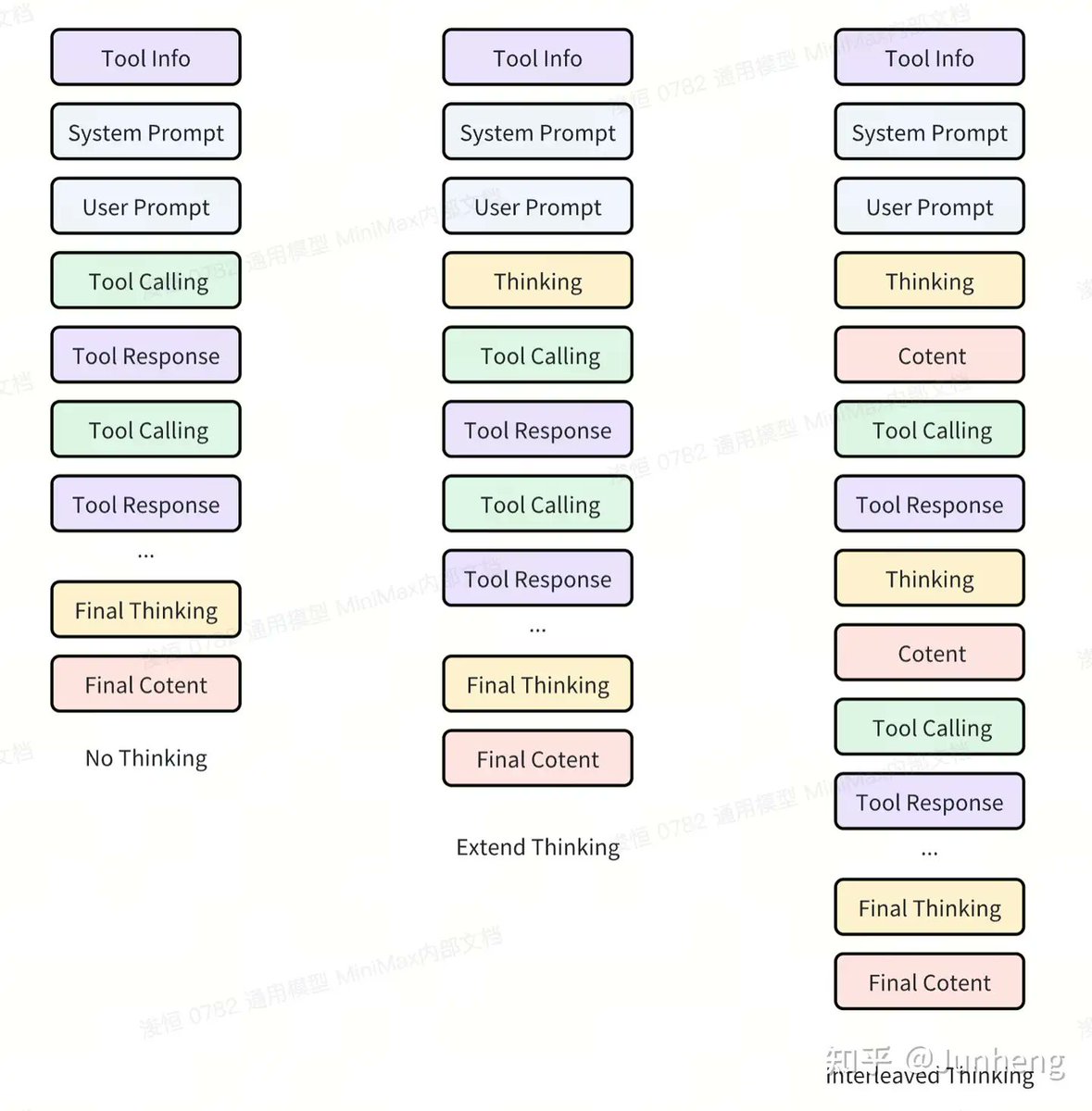
This sounds abstract, so let's break it down. Think about everything that can change in a single agent task:
- The Tool Info and available toolset.
- The System Prompt defining the agent's persona and rules.
- The User Prompt and its specific goal.
- The Environment itself (files, codebases, APIs).
- The Tool Responses returned at each step. Our old "tool scaling" approach only addressed the first item. It ignored perturbations in all the other parts of the process. Armed with this new understanding, our team built a comprehensive data pipeline designed for full-trajectory generalization. The data it generates trains the model to be stable against perturbations at every step. The results have been incredibly encouraging. In internal tests, we threw obscure, "cold-start" scaffolding at M2—frameworks we'd barely considered—and its performance exceeded our expectations. Both its tool-calling and instruction-following abilities generalized beautifully.
What's Next?
Our work on M2 taught us an immense amount about agents, generalization, and data, but it has opened up more questions than it answered. Many of our ideas are still on the whiteboard. In the coming months, we will be exploring these frontiers even more deeply, and we can't wait to bring you the next generation of powerful and genuinely useful models.
Getting Involved
- Use the Model: We sincerely hope you'll put M2 to the test. You can access it through our official channels or find the open-sourced version to conduct your own research.
- Join Our Team: If these are the kinds of challenges that excite you, we're hiring. We are always looking for passionate people to join us in the mission to build AGI. Please send us your resume!
To find navigation and other pages in this documentation, fetch the llms.txt file at: https://platform.minimax.io/docs/llms.txt
docs/m2-1.md (verbatim)
1 placeholder credential shortened to pass the site's secret filter.
Compatible Anthropic API
Call MiniMax models using the Anthropic SDK
To meet developers' needs for the Anthropic API ecosystem, our API now supports the Anthropic API format. With simple configuration, you can integrate MiniMax capabilities into the Anthropic API ecosystem.
Quick Start
1. Install Anthropic SDK
<CodeGroup> ```bash Python theme={null} pip install anthropic ```npm install @anthropic-ai/sdk
2. Configure Environment Variables
For international users, use https://api.minimax.io/anthropic; for users in China, use https://api.minimaxi.com/anthropic
export ANTHROPIC_BASE_URL=https://api.minimax.io/anthropic
export ANTHROPIC_API_KEY=YOUR_KEY
3. Call API
import anthropic

client = anthropic.Anthropic()

message = client.messages.create(
    model="MiniMax-M2.1",
    max_tokens=1000,
    system="You are a helpful assistant.",
    messages=[
        {
            "role": "user",
            "content": [
                {
                    "type": "text",
                    "text": "Hi, how are you?"
                }
            ]
        }
    ]
)

for block in message.content:
    if block.type == "thinking":
        print(f"Thinking:\n{block.thinking}\n")
    elif block.type == "text":
        print(f"Text:\n{block.text}\n")
4. Important Note
In multi-turn function call conversations, the complete model response (i.e., the assistant message) must be append to the conversation history to maintain the continuity of the reasoning chain.
- Append the full
response.contentlist to the message history (includes all content blocks: thinking/text/tool_use)
Supported Models
When using the Anthropic SDK, the MiniMax-M2.1 MiniMax-M2.1-lightning MiniMax-M2 model is supported:
| Model Name | Description |
|---|---|
| MiniMax-M2.1 | Powerful Multi-Language Programming Capabilities with Comprehensively Enhanced Programming Experience (output speed approximately 60 tps) |
| MiniMax-M2.1-lightning | Faster and More Agile (output speed approximately 100 tps) |
| MiniMax-M2 | Agentic capabilities, Advanced reasoning |
Compatibility
Supported Parameters
When using the Anthropic SDK, we support the following input parameters:
| Parameter | Support Status | Description |
|---|---|---|
model |
Fully supported | supports MiniMax-M2.1 MiniMax-M2.1-lightning MiniMax-M2 model |
messages |
Partial support | Supports text and tool calls, no image/document input |
max_tokens |
Fully supported | Maximum number of tokens to generate |
stream |
Fully supported | Streaming response |
system |
Fully supported | System prompt |
temperature |
Fully supported | Range (0.0, 1.0], controls output randomness, recommended value: 1 |
tool_choice |
Fully supported | Tool selection strategy |
tools |
Fully supported | Tool definitions |
top_p |
Fully supported | Nucleus sampling parameter |
metadata |
Fully Supported | Metadata |
thinking |
Fully Supported | Reasoning Content |
top_k |
Ignored | This parameter will be ignored |
stop_sequences |
Ignored | This parameter will be ignored |
service_tier |
Ignored | This parameter will be ignored |
mcp_servers |
Ignored | This parameter will be ignored |
context_management |
Ignored | This parameter will be ignored |
container |
Ignored | This parameter will be ignored |
Messages Field Support
| Field Type | Support Status | Description |
|---|---|---|
type="text" |
Fully supported | Text messages |
type="tool_use" |
Fully supported | Tool calls |
type="tool_result" |
Fully supported | Tool call results |
type="thinking" |
Fully supported | Reasoning Content |
type="image" |
Not supported | Image input not supported yet |
type="document" |
Not supported | Document input not supported yet |
Examples
Streaming Response
import anthropic

client = anthropic.Anthropic()

print("Starting stream response...\n")
print("=" * 60)
print("Thinking Process:")
print("=" * 60)

stream = client.messages.create(
    model="MiniMax-M2.1",
    max_tokens=1000,
    system="You are a helpful assistant.",
    messages=[
        {"role": "user", "content": [{"type": "text", "text": "Hi, how are you?"}]}
    ],
    stream=True,
)

reasoning_buffer = ""
text_buffer = ""

for chunk in stream:
    if chunk.type == "content_block_start":
        if hasattr(chunk, "content_block") and chunk.content_block:
            if chunk.content_block.type == "text":
                print("\n" + "=" * 60)
                print("Response Content:")
                print("=" * 60)

    elif chunk.type == "content_block_delta":
        if hasattr(chunk, "delta") and chunk.delta:
            if chunk.delta.type == "thinking_delta":
                # Stream output thinking process
                new_thinking = chunk.delta.thinking
                if new_thinking:
                    print(new_thinking, end="", flush=True)
                    reasoning_buffer += new_thinking
            elif chunk.delta.type == "text_delta":
                # Stream output text content
                new_text = chunk.delta.text
                if new_text:
                    print(new_text, end="", flush=True)
                    text_buffer += new_text

print("\n")
Tool Use & Interleaved Thinking
Learn how to use M2.1 Tool Use and Interleaved Thinking capabilities with Anthropic SDK, please refer to the following documentation.
<Columns cols={1}> <Card title="M2.1 Tool Use & Interleaved Thinking" icon="book-open" href="/guides/text-m2-function-call#anthropic-sdk" arrow="true" cta="Click here"> Learn how to leverage MiniMax-M2.1 tool calling and interleaved thinking capabilities to enhance performance in complex tasks. </Card> </Columns>Important Notes
<Warning> 1. The Anthropic API compatibility interface currently only supports the `MiniMax-M2.1` `MiniMax-M2` modelThe
temperatureparameter range is (0.0, 1.0], values outside this range will return an errorSome Anthropic parameters (such as
thinking,top_k,stop_sequences,service_tier,mcp_servers,context_management,container) will be ignoredImage and document type inputs are not currently supported
</Warning>
Related Links
Recommended Reading
<Columns cols={2}> <Card title="Text Generation" icon="book-open" href="/guides/text-generation" arrow="true" cta="Click here"> Supports text generation via compatible Anthropic API and OpenAI API. </Card> <Card title="Compatible OpenAI API" icon="book-open" href="/api-reference/text-openai-api" arrow="true" cta="Click here"> Use OpenAI SDK with MiniMax models </Card> <Card title="M2.1 for AI Coding Tools" icon="book-open" href="/guides/text-ai-coding-tools" arrow="true" cta="Click here"> MiniMax-M2.1 excels at code understanding, dialogue, and reasoning. </Card> <Card title="M2.1 Tool Use & Interleaved Thinking" icon="book-open" href="/guides/text-m2-function-call" arrow="true" cta="Click here"> AI models can call external functions to extend their capabilities. </Card> </Columns>To find navigation and other pages in this documentation, fetch the llms.txt file at: https://platform.minimax.io/docs/llms.txt
Back to muratcankoylan/Agent-Skills-for-Context-Engineering or Agent skills.